Ken's Labyrinth
Saves are stored in this browser.
Player notes
About this game
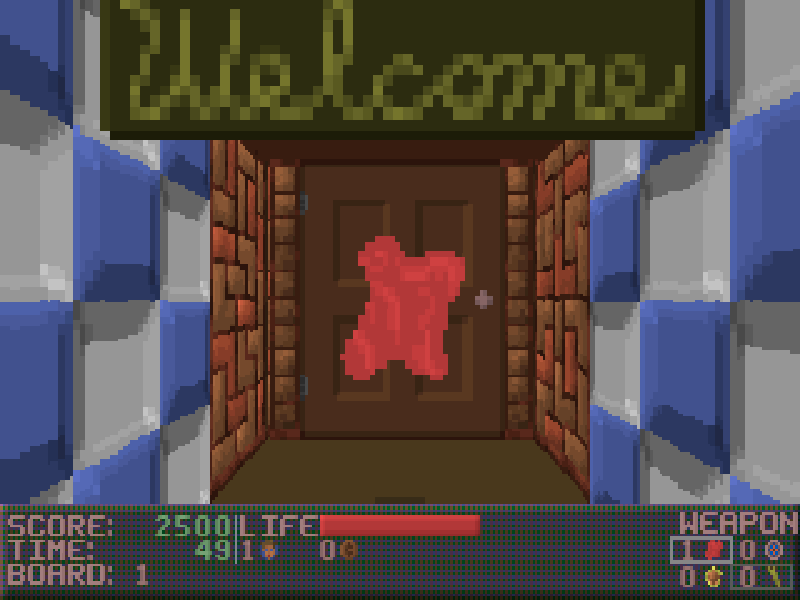
Ken's Labyrinth mixes first-person maze exploration with an unusually playful collection of enemies, weapons and machines. Search the corridors for keys and supplies, collect coins for vending machines, and use different projectile types to deal with what is around the next corner. The full release contains three episodes, beginning with The Search for Sparky.
The arrow keys move and turn. The two Ctrl keys have different jobs: Left Ctrl fires, while Right Ctrl held with Left or Right makes you sidestep. Space opens doors or operates an object when you are close enough. F1, F2 and F3 select the three weapon types; they are not the help, save and load shortcuts used by some other DOS shooters.
Press Esc for the menu containing New game, Load game, Save game and Help. Enter raises or lowers the status bar during play and confirms menu choices. Save into an empty slot if you want your own progress; the original package also contains the author's bonus saves near episode endings and at a slot machine.
This page uses the complete DOS 2.1 release that Ken Silverman made freely available with Epic MegaGames' permission, including the author's later KENSBFIX sound-effects fix. The original files and notices remain in the package. The browser bundle adds settings made with the original SETUP program and a conservative emulated CPU speed. Historical purchase instructions are obsolete, and the game remains in English.
Start here
Quick tips
Walk right up to a door before tapping Space. If it finishes closed, tap again; the author documents rapid door toggling on faster hardware.
Gold and silver keys open matching doors. The manual notes that keys do not carry over to the next level.
Coins can buy supplies at vending machines. Face the machine and use Space to interact.
Open Esc and choose Save game for a native save. F2 selects the bouncing-projectile weapon instead; it does not save this game.
- Arrow keys
- Move forward/backward and turn
- Left Ctrl
- Fire the selected weapon
- Space
- Open or unlock a door; use an object
- Right Ctrl + Left / Right
- Strafe without turning
- Left Shift
- Hold to run
- F1 / F2 / F3
- Select red fireballs / bouncing projectiles / homing missiles
- Enter
- Raise or lower the status bar; confirm menus
- P
- Pause or resume
- Esc
- Open the main menu, including save, load and help
- M
- Toggle game audio
- A / Z
- Raise or lower your viewpoint; the original release has known height-control bugs
Keep playing
Similar Games
Ratings & comments
Help improve this entry
Something not working?
Report a gameplay or information problem. Short reports are enough.
Archive notes
Rights and Source Notes
Browser play is available for this entry.
- Distribution
- Freeware
- Browser player
- js-dos · Browser play
- Added to archive
- 2026-10-31
No comments yet. Be the first to share a tip.