Kingdom of Kroz II
Saves are stored in this browser.
Player notes
About this game
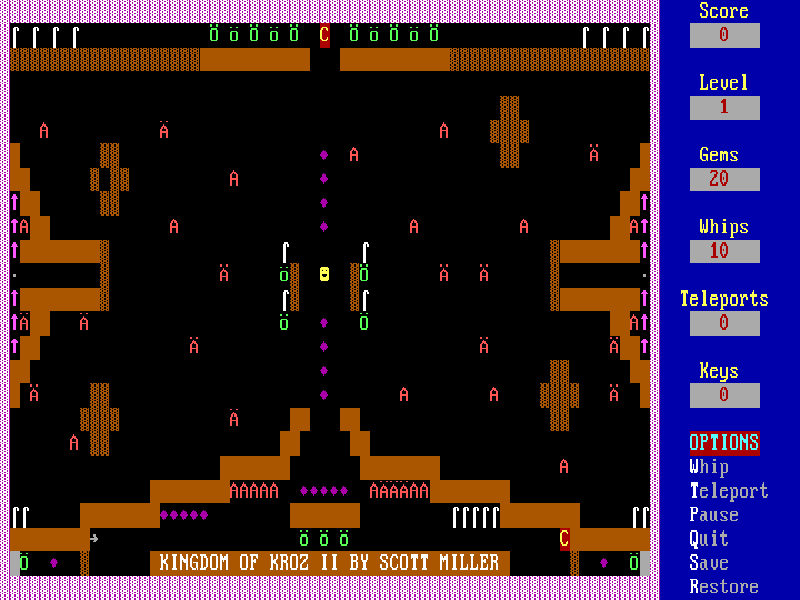
Kingdom of Kroz II turns a grid of text characters into an underground adventure. You are an archaeologist searching for a hidden amulet across 25 chambers. Treasures, keys, breakable walls and moving creatures share the screen, and touching an unfamiliar object reveals a short explanation of what it does.
The arrow keys move your character. Home, End, Page Up and Page Down add diagonal movement; W uses a whip and T uses a teleport when you have one. A creature that reaches you consumes gems, and an encounter without gems can end the run. Whips defeat nearby creatures, but the instructions also recommend saving them for breakable walls.
At startup, choose C for colour and S for the slow-PC timing used by this browser setup. Continue past the title, choose N for Novice, E for Experienced or A for Advanced, then B to begin. I opens the instructions. During play, P pauses, S saves and R restores. The native save system offers slots A, B and C and restores the selected level's starting position.
This is Scott Miller's 1990 Kingdom of Kroz II, version 2.0, the updated Kingdom of Kroz release. The original menu explicitly permits distribution by software libraries and bulletin-board systems. The game calls its model user-supported software and retains its historical registration screens; this page does not include the other Kroz games advertised there. All original files are preserved, and the in-game text is English.
Start here
Quick tips
Read the message when first touching an object; the same character graphics represent very different hazards and supplies.
Keep some whips for breakable walls instead of spending every charge on monsters.
Collect keys before heading for a blocked staircase. Faster monsters take more gems when they touch you.
Save at the start of a new level. The A, B and C choices are save slots, not disk-drive letters.
- Arrow keys
- Move through the chamber
- Home / End / Page Up / Page Down
- Move diagonally
- W
- Use a whip
- T
- Use a teleport when available
- P
- Pause the game
- S
- Choose slow-PC timing at startup; save during play
- R
- Restore a native save
- Q
- Open the quit prompt
- C
- Choose colour at startup; select save slot C when prompted
- N / E / A
- Select Novice, Experienced or Advanced difficulty
- B
- Begin from the menu; select save slot B when prompted
- I
- Read instructions from the menu
- Y
- Confirm a yes/no prompt
- Enter
- Continue notices or accept a default
Keep playing
Similar Games
Ratings & comments
Help improve this entry
Something not working?
Report a gameplay or information problem. Short reports are enough.
Archive notes
Rights and Source Notes
Browser play is available for this entry.
- Distribution
- User-supported software
- Browser player
- js-dos · Browser play
- Added to archive
- 2026-10-27
No comments yet. Be the first to share a tip.