Supernova
Saves are stored in this browser.
Player notes
About this game
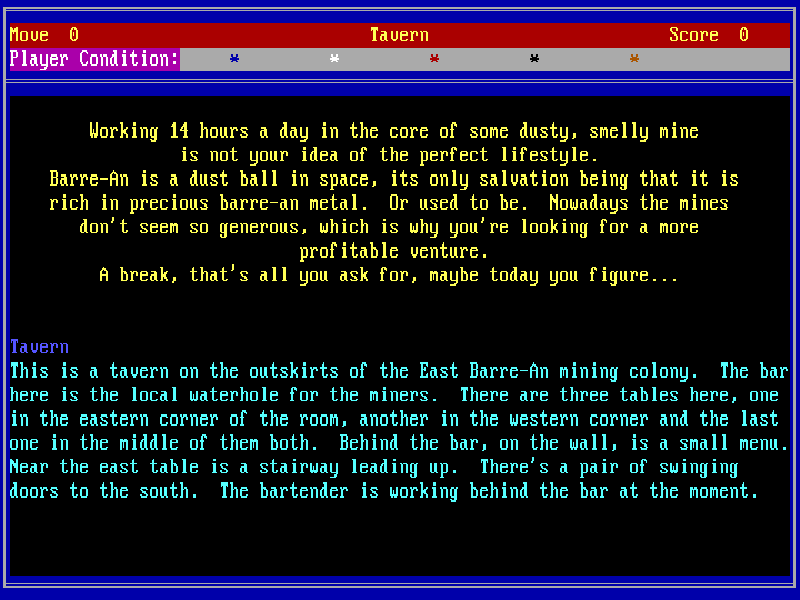
Supernova begins in a tavern on Barre-An, a mining world whose dwindling riches offer little hope of a better life. The adventure unfolds through room descriptions and typed commands. You examine objects, talk to characters and follow clues rather than steering a character with the arrow keys.
Choose C for colour, continue through the title screens and enter a character name. Type commands in English and press Enter to submit them. LOOK or L repeats the room description; INVENTORY or I lists your possessions. Directions such as N, S, E and W move between locations. COMMANDS or VERBS lists recognised verbs, and CLUE requests a hint for the current location.
SAVE and RESTORE use the game's own disk-based saves. At the disk-drive prompt, press Enter to accept A:, then supply a short filename such as TEST. This browser package provides the original default save drive, so no disk swapping is needed. After making a native save, use the website's save control to retain the virtual-disk changes for a later visit. That is separate from saving the current screen or a live emulator snapshot.
This is Supernova Version B from Apogee's March 2009 freeware/source re-release; the original adventure dates to 1987. The complete original ZIP, publisher notes and historical source material are retained, while only the required game files are mounted for play. The later freeware notice explains the release terms and supersedes the old registration instructions. The entire adventure is in English, and a physical keyboard is recommended for its free-form commands.
Start here
Quick tips
Start with LOOK and INVENTORY. Room descriptions often name objects worth examining before you move on.
Use CLUE when stuck and COMMANDS or VERBS when unsure which verbs the parser accepts.
Make a simple map of exits; short direction commands such as S can move you immediately to the next room.
For native saves, accept the default A: drive and use a short filename. Use the same name with RESTORE, and retain disk changes with the website's save control before leaving.
- Text + Enter
- Submit an English command
- LOOK / L
- Describe the current room
- INVENTORY / I
- List carried objects
- N / S / E / W
- Travel in the named direction
- EXAMINE + object
- Inspect a named object
- COMMANDS / VERBS
- List recognised verbs
- CLUE
- Request a location-specific hint
- SAVE / RESTORE
- Save or restore using the default A: drive and a filename
- QUIT / Q
- End the current adventure
Keep playing
Similar Games
Ratings & comments
Help improve this entry
Something not working?
Report a gameplay or information problem. Short reports are enough.
Archive notes
Rights and Source Notes
Browser play is available for this entry.
- Distribution
- Freeware
- Browser player
- js-dos · Browser play
- Added to archive
- 2026-10-27
No comments yet. Be the first to share a tip.