LBreakoutHD
Save behavior varies by game. Check the notes below.
Player notes
About this game
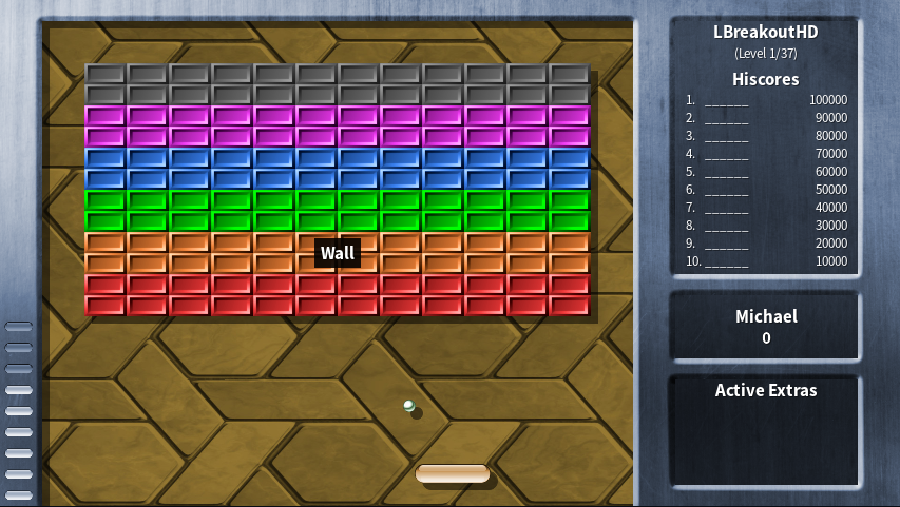
LBreakoutHD gives the familiar brick breaker a wide playing field and a varied collection of power-ups. Move the paddle beneath the falling ball, aim your rebounds and clear the breakable bricks. Sticky paddles, extra balls and temporary barriers can rescue a run; other pickups can freeze or shrink the paddle and make the next return harder. The original LBreakoutHD set contains 37 levels, with additional sets and mini-games included in the release.
Michael Speck created LBreakoutHD as a widescreen remake of LBreakout2, retaining the older C game engine and adding an SDL2 interface. This browser edition builds the author’s 1.2.4 release. It keeps the Standard and Classic themes, the original level sets, sound effects and credits. This is a modern native-source port, not a DOS executable. The in-game menus remain in English.
Choose New Game, then Start Original Levels. Left and Right move the paddle; Space or V releases a ball and fires weapons when available. Use Up, Down and Enter in menus. The shared touch controller supports moving and releasing together, and its layout can be customized. A desktop mouse also positions the paddle, with either mouse button used to release balls. P pauses the game.
To leave a run, press Esc and confirm with Y. Resume Game restores the saved level, score and lives, restarting that level rather than restoring the exact ball position. Settings, scores and the resume file stay in this browser on this site. Clearing browser data removes these local records. Use Saves to upload a cloud backup manually and restore it on another device. Sound starts muted and can be enabled from the player.
The browser integration adds safe input release, host pause, real audio mute and isolated local storage. The startup download omits development files while retaining the shipped themes and levels. Original licenses, artwork credits and corresponding source are linked below. Initial gameplay, touch combinations, audio and save restoration have been checked; complete level sets, editor workflows and physical-phone performance are not certified.
Start here
Quick tips
Start with New Game → Start Original Levels; the native menu also lets you change difficulty before playing.
Use Space or V to release a ball held by the sticky paddle. Holding the button also fires a weapon while that extra is active.
Read the native Help menu before chasing every pickup: some extras make the game harder.
Hold X for faster paddle movement. C accelerates the balls, so use it sparingly while learning.
Leave with Esc, then Y. Resume Game restarts the saved level with your recorded score and lives; it is not an instant snapshot.
- Left / Right
- Move the paddle left or right
- Space
- Fire or release a ball from the paddle
- V
- Fire or release a ball from the other side of the paddle
- Up / Down
- Move through menu choices
- Enter
- Confirm the selected menu option
- Esc
- Open the quit-game question or go back in menus
- Y
- Confirm a yes/no question
- N
- Cancel a yes/no question
- P
- Pause or resume the game
- X
- Hold to accelerate paddle movement
- C
- Hold to speed up balls
- Backspace
- Recall an idle ball when allowed
- W
- Warp to the next level when the game permits it
Keep playing
Similar Games
Ratings & comments
Help improve this entry
Something not working?
Report a gameplay or information problem. Short reports are enough.
Archive notes
Rights and Source Notes
Browser play is available for this entry. Official project references are listed below.
- Distribution
- Source restoration
- Browser player
- WebAssembly · Browser play
- Added to archive
- 2026-10-24
- Official references
- Source code
- Download open-source code packageSource code only; this is not a game ROM download.
No comments yet. Be the first to share a tip.