Moraff's Pinball
Saves are stored in this browser.
Player notes
About this game
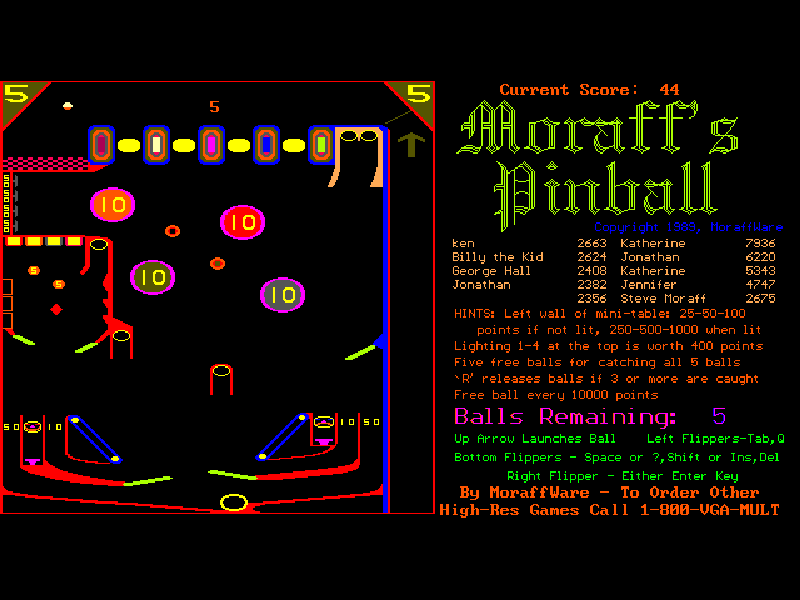
Moraff’s Pinball puts a compact pinball table beside its instructions and score display. Aim for bumpers and drop targets, keep the ball in play with several sets of flippers, and try to catch balls in the chutes around the table. The supplied 5.0 release begins with five balls.
The controls are divided between the lower flippers and the smaller side sections. Up launches a ball, Space operates the lower pair, Tab operates the left-side flippers and Enter operates the right flipper. The table explains its bonuses while you play; F3 and F4 adjust speed for faster or slower machines.
This is MoraffWare’s original DOS shareware, with its registration notice, high-score file and other original files intact. The game dates from 1989; the archived package identifies itself as version 5.0. It is an evaluation release, not a modern remake or a purchase of a registered edition.
Start here
Quick tips
Continue past the opening notice, then press 2 to play. The original menu also offers EGA and VGA display modes.
Press Up to launch, then use Space, Tab and Enter for the different flippers. Timing matters more than holding every key down.
Read the instructions beside the table for chute bonuses. R releases captured balls once three or more have been caught.
- 2
- Start the pinball table from the main menu.
- Up
- Launch a ball onto the table.
- Space
- Operate the lower flippers.
- Tab
- Operate the left-side flippers.
- Enter
- Continue the opening notice; operate the right flipper during play.
- R
- Release captured balls when three or more are caught.
- F3 / F4
- Adjust the game speed.
- Esc
- Exit the game.
Keep playing
Similar Games
Ratings & comments
Help improve this entry
Something not working?
Report a gameplay or information problem. Short reports are enough.
Archive notes
Rights and Source Notes
Browser play is available for this entry.
- Distribution
- Shareware
- Browser player
- js-dos · Browser play
- Added to archive
- 2026-11-03
No comments yet. Be the first to share a tip.