Shooting Gallery
Saves are stored in this browser.
Player notes
About this game
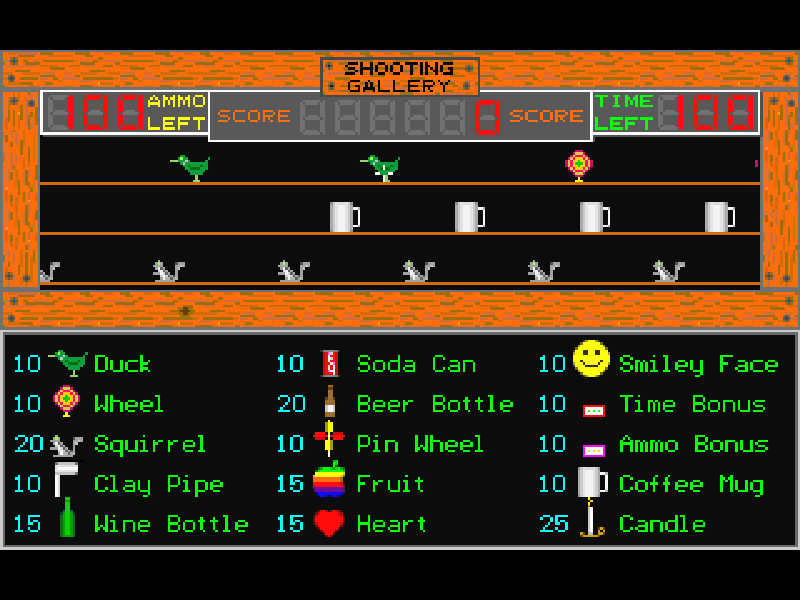
Shooting Gallery is a mouse-controlled target game built around seven shooting rounds. Move the sight and click to fire at the targets on screen. The opening Birds and Bottles round gives you a supply of ammunition and a time limit, so a missed shot still has a cost.
Later rounds vary the targets and timing rather than turning the game into a first-person adventure. The title screen offers Play and Practice alongside options and help. A mouse or trackpad is needed for aiming; the keyboard alone is not a substitute for its pointer controls.
This is Nels Anderson’s 3.3 shareware release from 1995, following the original 1990 game. The original manual distinguishes its smaller shareware sound library from the registered release. This package preserves that evaluation edition, its help and registration notices.
Start here
Quick tips
Use the mouse to choose Play at the top of the title screen, then click when the round asks you to begin.
Watch the ammunition counter: clicking fires even when the sight is not over a target.
Space pauses the first and fourth rounds; click to resume. Esc abandons the current round.
- Space
- Pause rounds 1 and 4; click to resume.
- Esc
- Abandon the current round.
- Alt + X
- Exit the program.
- Mouse
- Move the sight and point at menu choices.
- Left mouse button
- Select a menu item, begin a round or fire.
Keep playing
Similar Games
Ratings & comments
Help improve this entry
Something not working?
Report a gameplay or information problem. Short reports are enough.
Archive notes
Rights and Source Notes
Browser play is available for this entry.
- Distribution
- Shareware
- Browser player
- js-dos · Browser play
- Added to archive
- 2026-11-03
No comments yet. Be the first to share a tip.