Moraff's Revenge
Saves are stored in this browser.
Player notes
About this game
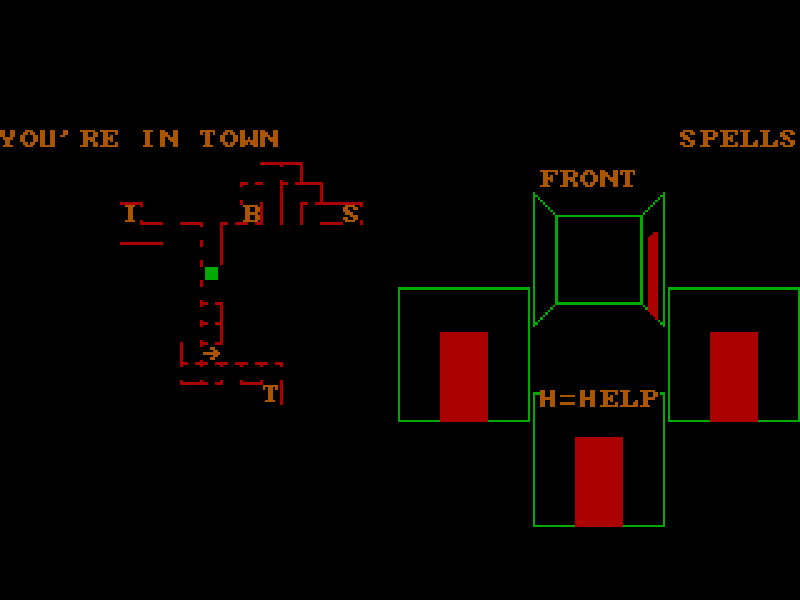
Moraff’s Revenge is an early dungeon role-playing game that presents several directional views alongside a map. Create a character, choose a race and class, then explore from town. The original character-creation screens explain how attributes affect fighters and wizards before you accept a set of scores.
The main menu separates creating a character from playing one. Choose 1 to create, accept the rolled attributes with Y, pick a class and enter a name. Back at the menu, choose 2 and select the character to play. Read the help once in the world: movement modes and the many item and spell commands take practice.
This is Beginner’s Version 3.2 of Steve Moraff’s 1988 game. It is not the full Advanced edition described in the historical ordering material. Original prompts and notices remain. Q saves and quits within the game; the website’s file-save control provides a separate local backup of the emulator files.
Start here
Quick tips
For a first character, the original help recommends a fighter and paying attention to hit points and strength.
After creating a character, return to the main menu and choose 2 to play; creation alone does not enter the world.
Use F1 to read the original command help. Q saves and quits, while Esc switches movement modes.
- Arrow keys
- Move or turn according to the current movement mode.
- Enter
- Continue prompts and confirm the selected character or menu item.
- 1 / 2
- Choose numbered menu options, including Create and Play.
- Y / N
- Answer yes/no prompts; Y accepts rolled attributes.
- F1
- Display the original command help.
- Esc
- Switch movement modes during play.
- P
- Pause the game.
- Q
- Save the character and quit the game.
Keep playing
Similar Games
Ratings & comments
Help improve this entry
Something not working?
Report a gameplay or information problem. Short reports are enough.
Archive notes
Rights and Source Notes
Browser play is available for this entry.
- Distribution
- Shareware
- Browser player
- js-dos · Browser play
- Added to archive
- 2026-11-03
No comments yet. Be the first to share a tip.