Moraff's Super Blast I
Saves are stored in this browser.
Player notes
About this game
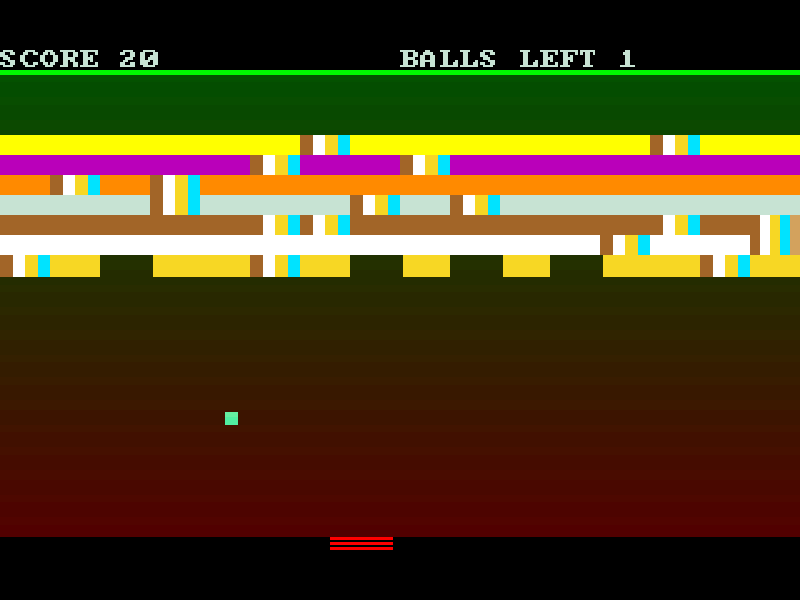
Moraff’s Super Blast I is a brick-breaking arcade game: move the paddle to return a bouncing ball and work through the blocks above it. The board shows your score as the pattern opens up, and a missed return costs a ball.
The original program offers one- and two-player choices and more than one control method. For the single-player keyboard setup used here, choose the cursor keys when prompted, then move left and right to line up the return. The built-in Paddle Control page explains the additional controls for other setups.
This is Super Blast I, first released in 1990, in the shareware package updated in May 1993. Super Blast II and III and the extra screens promoted in the ordering notice are separate releases. MoraffWare’s original files, help and notices are preserved.
Start here
Quick tips
At the video menu choose 4. Choose 1 for Play and 1 for one player, then press a keyboard key for the controls. At Game Select, choose 1 for Brick Wall; continue the reminder with Enter.
Continue the control reminder with Enter. Use Left and Right to position the paddle before the ball reaches it.
Choose 2 from the main menu for instructions; the Paddle Control section explains the original input options.
- 4
- Select standard color VGA at startup.
- 1
- Choose Play, one player and Brick Wall at their corresponding menus.
- 2
- Open instructions from the main menu.
- Left / Right
- Move the paddle horizontally in the cursor-key setup.
- Enter
- Continue the title and control reminder.
Keep playing
Similar Games
Ratings & comments
Help improve this entry
Something not working?
Report a gameplay or information problem. Short reports are enough.
Archive notes
Rights and Source Notes
Browser play is available for this entry.
- Distribution
- Shareware
- Browser player
- js-dos · Browser play
- Added to archive
- 2026-11-03
No comments yet. Be the first to share a tip.