Moraff's World
Saves are stored in this browser.
Player notes
About this game
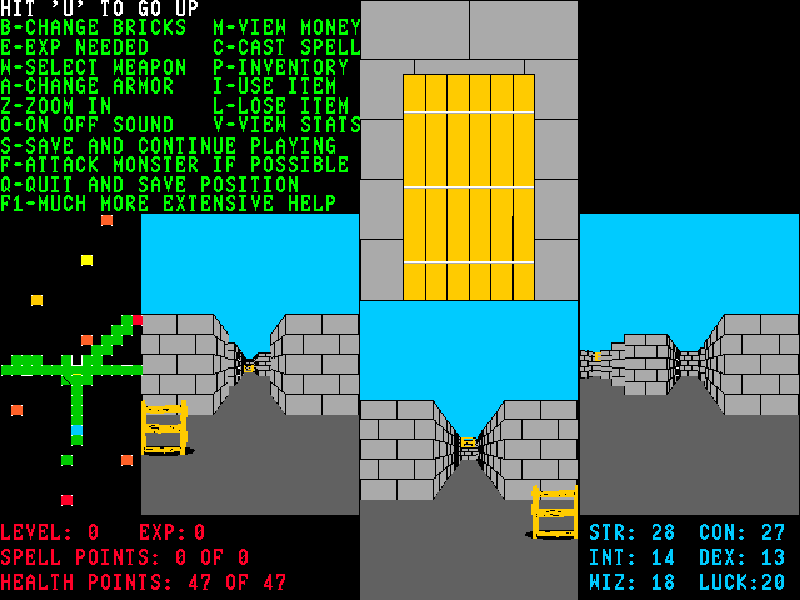
Moraff’s World is Steve Moraff’s first-person dungeon RPG. Choose a race and class, accept or reroll the generated attributes, name your character and begin exploring. Four simultaneous views and a map show the surrounding area; understanding that layout is part of learning the game.
Town services, equipment and character statistics matter as you venture deeper. Weapons and armour have their own menus, while magical classes can cast spells. The command list is printed beside the play area and F1 opens more extensive help, so it is worth reading before spending resources or approaching a monster.
This page uses version 1.0 of the beginner shareware package, not the extended registered edition. Select 7 for VGA at startup, continue through the introduction and follow the character prompts. The original files and distribution README are preserved. S saves within the game and Q saves and quits; the website’s file-save control backs up those game files rather than replacing the native save step.
Start here
Quick tips
Choose VGA with 7. Wait for each opening or character screen to finish drawing before entering the next choice.
Use F1 and the printed command list. Four separate views can make the first few moves confusing; watch the map as well.
Save with S before backing up the game files through the website. Q is the game’s save-and-quit command.
- Arrow keys
- Move through the town or dungeon.
- 0–9
- Choose numbered setup and character options.
- Enter
- Confirm text and continue through introductions.
- Y / N
- Accept or reject a generated character when prompted.
- F
- Attack a monster when possible.
- C
- Cast a spell.
- W / A
- Open weapon or armour selection.
- F1
- Open the detailed game help.
- S
- Save the game and continue.
- Q
- Save the current position and quit.
Keep playing
Similar Games
Ratings & comments
Help improve this entry
Something not working?
Report a gameplay or information problem. Short reports are enough.
Archive notes
Rights and Source Notes
Browser play is available for this entry.
- Distribution
- Shareware
- Browser player
- js-dos · Browser play
- Added to archive
- 2026-11-04
No comments yet. Be the first to share a tip.