One Must Fall 2097
Saves are stored in this browser.
Player notes
About this game
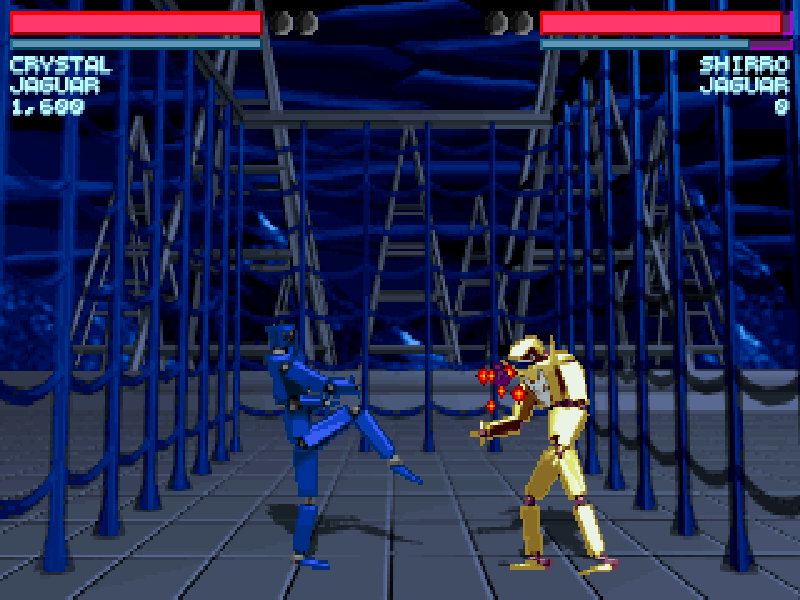
One Must Fall 2097 is a robot fighting game developed by Diversions Entertainment and published by Epic MegaGames. You choose both a pilot and a machine, then enter a side-view arena where spacing, blocking and the timing of individual attacks matter. The robots are large, but a poorly timed kick still leaves an opening for the opponent.
A one-player match is the quickest introduction. Tournament play adds a longer progression: earnings go toward improving your robot between fights. This shareware edition offers three robots, one arena and one tournament, rather than the full registered selection.
Choose Regular Game in the outer launcher, then One Player Game. Confirm your pilot and robot selections with Enter. The default first-player controls use the arrow keys for movement, jumping and crouching, Enter for a punch, and the right Shift key for a kick. Moving away from the opponent blocks attacks; standing and crouching blocks cover different attacks.
This is the original DOS 2.1 shareware package, with its manual and Epic MegaGames distribution terms preserved. Shareware was a try-before-you-buy release, not a copy of the registered game. The browser package includes settings produced by the original setup program; the game itself and its menus remain in English. Network and modem modes have not been verified here. This browser release currently runs without music or sound effects for compatibility.
Start here
Quick tips
Choose Regular Game first. Allow the introductory animation and screen transitions to finish before confirming the next menu.
Use right Shift for kicks; left Shift is a different key. On touchscreens, Enter and Right Shift are available in the main action area.
Back away to block, then attack after the opponent misses. Avoid holding an attack button without watching the distance.
Use Esc for the in-fight menu. One-player mode is the recommended starting point; this page documents the first-player keys.
Music and sound effects are disabled in this browser release. The mute control does not enable a sound card.
- Arrow keys
- Move left or right; jump with Up and crouch with Down
- Enter
- Punch; confirm menu, pilot and robot selections
- Right Shift
- Kick
- Left / Right
- Move away from the opponent to block; combine with Down for a low block
- Up + Left / Right
- Jump diagonally
- Down then Up
- Crouch, then jump higher
- P
- Pause the fight
- Esc
- Open the in-fight menu; return from a menu
Keep playing
Similar Games
Help improve this entry
Something not working?
Report a gameplay or information problem. Short reports are enough.
Archive notes
Rights and Source Notes
Browser play is available for this entry.
- Distribution
- Shareware
- Browser player
- js-dos · Browser play
- Added to archive
- 2026-10-17