Overkill
Saves are stored in this browser.
Player notes
About this game
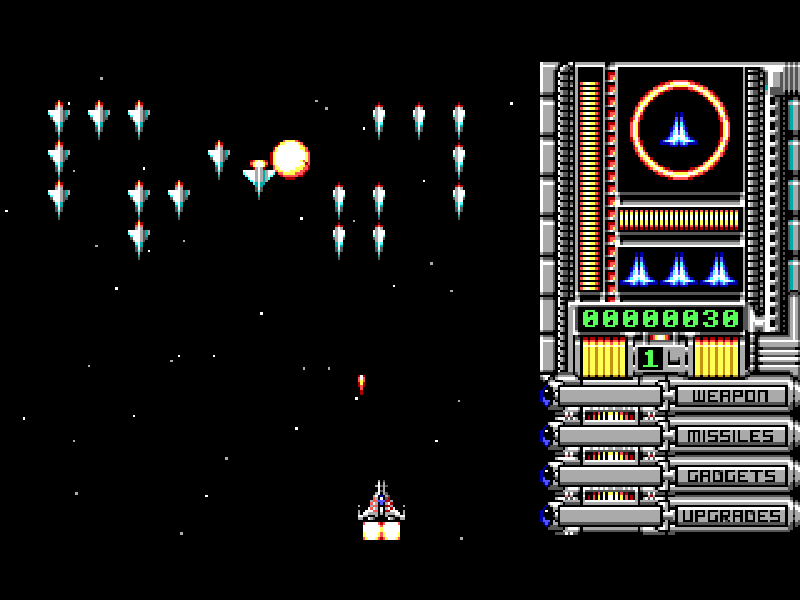
Overkill starts with a pilot returning to a destroyed homeworld and pursuing the attackers through six planets. Each planet begins with an orbital guard wave before the fight moves over its surface. The scrolling battlefield mixes enemy formations, obstacles and supplies; running out of fuel is another way to lose your ship.
Use the arrow keys to move and Space to fire. Collected power-up pods advance the red selector beside the equipment categories. Press Tab to take the currently offered weapon, missile, gadget or ship upgrade; waiting for another pod moves the selector onward instead. Fuel cells refill the fuel supply, and shield pickups help you survive enemy fire.
Press Space to reach the planet selector, choose 1–6, then press Space again to launch. D changes the difficulty there. I opens the main menu's original Instructions. F10 pauses. Esc opens the exit prompt during a game; Alt+X is the original immediate exit shortcut. The game also has a Redefine Keys screen, so these instructions assume its original keyboard layout.
This is the complete six-planet version 2.0 archive with its later CC BY-ND 3.0 license, not the two-planet shareware package. Ste Cork / Tech-Noir created the code and concept, Martin Holland supplied graphics, Tony Williams / Sound Images created sound and music, and Mark A. Rein produced it. All original files and credits are retained. The external launch configuration selects the original EGA/VGA and AdLib options without altering the game.
Start here
Quick tips
Allow the opening logos to finish. Space opens the planet selector; choose 1–6 and press Space to begin.
A collected upgrade pod moves the equipment selector. Press Tab to accept the offered item, or collect another pod to move to the next category.
Watch both fuel and shields. Surviving enemy fire is not enough if the fuel supply runs out.
I at the main menu opens five pages of instructions; Up and Down turn the pages. F10 pauses during play.
- Arrow keys
- Move the ship; Up and Down also turn instruction pages
- Space
- Fire, open planet selection or launch the selected planet
- Tab
- Choose the weapon or equipment upgrade indicated by the red selector
- 1 / 2 / 3 / 4 / 5 / 6
- Choose a planet on the selection screen
- D
- Cycle difficulty on the planet selection screen
- I
- Open Instructions from the main menu
- F10
- Pause play
- Y
- Confirm the exit prompt
- Esc
- Leave instructions or open the in-game exit prompt
Keep playing
Similar Games
Ratings & comments
Help improve this entry
Something not working?
Report a gameplay or information problem. Short reports are enough.
Archive notes
Rights and Source Notes
Browser play is available for this entry.
- Distribution
- CC BY-ND 3.0
- Browser player
- js-dos · Browser play
- Added to archive
- 2026-10-31
No comments yet. Be the first to share a tip.