Raptor: Call of the Shadows
Saves are stored in this browser.
Player notes
About this game
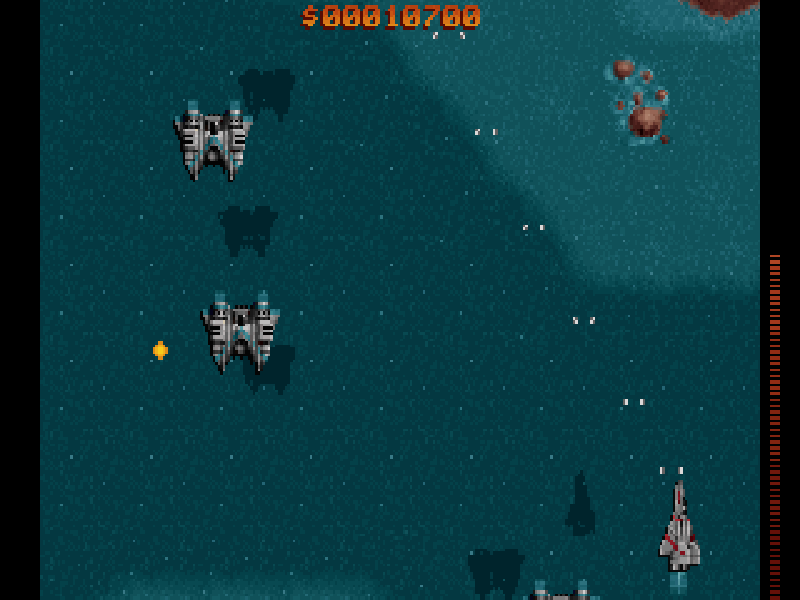
Raptor: Call of the Shadows is a 1994 vertically scrolling shooter developed by Cygnus Studios and distributed by Apogee Software. You fly as a mercenary, earning money from destroyed targets and spending it on equipment between missions. Ground installations and airborne enemies create different threats as the landscape scrolls beneath your fighter.
Create a pilot with New Mission, enter a name and callsign, then choose a difficulty. In the hangar, select Fly Mission and Bravo Sector. The arrows move between menu choices and Enter confirms. On a phone, the player’s keyboard is available for the two name fields. Rookie is the easier regular difficulty; Training is a separate introductory mode.
In this package’s original Keyboard Configuration, arrows move the aircraft, Ctrl fires, Alt changes the selected special weapon and Space uses a Mega Bomb when one is in your inventory. Special weapons and bombs must be acquired before you can use them. F1 opens context-sensitive help.
After a mission, the Supply Room lets you spend your earnings on upgrades. F2 in the hangar quick-saves the pilot. This is DOS version 1.2 shareware, containing Bravo Sector; Tango Sector and Outer Regions are not included.
Start here
Quick tips
Choose Bravo Sector for the shareware missions; the other sector names remain visible in the menu.
Enter a name and callsign before choosing a difficulty. The phone keyboard can fill these fields.
Watch the shield meter and visit the Supply Room between missions; Alt and Space need the corresponding equipment to be useful.
- Arrow keys
- Move the fighter; select menu options
- Ctrl
- Fire
- Alt
- Change the selected special weapon
- Space
- Use a Mega Bomb when available
- Enter
- Confirm menu choices and pilot-name fields
- F1
- Open context-sensitive help
- F2
- Quick-save the pilot in the hangar
- Page Up / Page Down
- Turn help pages
- Esc
- Close help or return to a menu
Keep playing
Similar Games

Help improve this entry
Something not working?
Report a gameplay or information problem. Short reports are enough.
Archive notes
Rights and Source Notes
Browser play is available for this entry.
- Distribution
- Shareware
- Browser player
- js-dos · Browser play
- Added to archive
- 2026-10-16