SDL Sopwith
Save behavior varies by game. Check the notes below.
Player notes
About this game
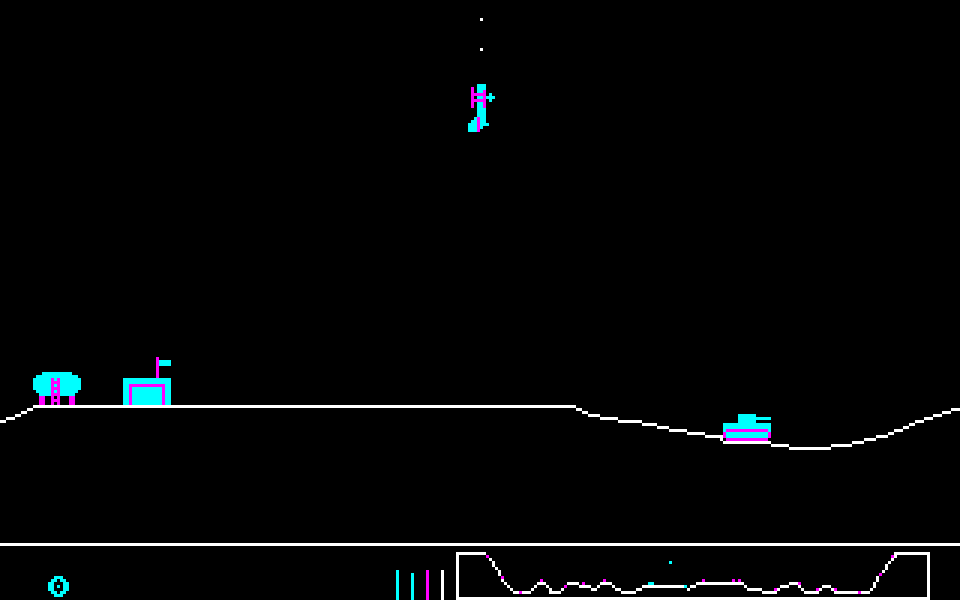
SDL Sopwith puts a tiny biplane above a scrolling countryside of airfields, buildings and oil tanks. Your job is to destroy the enemy targets without exhausting your planes, fuel and ammunition. Hitting your own installations costs points, and careless low flying can end a sortie quickly.
This is the SDL source port maintained by Simon Howard and contributors, based on David L. Clark's Sopwith code. The browser build uses the 2.9.0 source snapshot and retains its bright CGA-style graphics and PC-speaker sound. It is a different edition from the original DOS Sopwith II and Steve Bennett's Sopwith Clone, which have separate pages here.
Press S for Single Player, then N for Novice or E for Expert. Novice gives you unlimited ammunition and bombs and prevents stalls, making it a useful place to learn. Choose C from the title menu to face computer-controlled planes. Increase the throttle with X and pull up with comma; slash lowers the nose. These controls follow the plane's orientation, so rolling it changes how they feel.
The website's shared touch pad uses the same keyboard controls. Its four main buttons adjust throttle, fire and drop bombs; Keys provides the other commands, and Configure lets you change the layout. Browser storage retains settings and the original high-score table, not an unfinished flight. High scores apply to the standard computer-opponent mode. The game menus remain in English, and this browser edition does not include online multiplayer.
Start here
Quick tips
Start with S, then N. Learn to take off and return before trying Expert or the computer opponents.
Hold X to gain speed and use comma briefly to raise the nose. Holding the elevator too long can send the plane into a loop.
Press H to engage the autopilot home for fuel and ammunition. Keep an eye on the gauges along the bottom of the screen.
Space fires forward and B drops a bomb. Avoid your own buildings: destroying them reduces your score.
Use Ctrl+Q to end a sortie or Ctrl+R to restart. Settings and high scores stay in this browser when storage is available; the current flight does not.
- S
- Start a solo game; during flight, toggle the original game sound
- N
- Choose Novice after selecting Single Player
- E
- Choose Expert after selecting Single Player
- C
- Start against computer-controlled planes
- Comma
- Steer up: raise the nose relative to the plane's orientation
- Slash
- Steer down: lower the nose relative to the plane's orientation
- X / Z
- Increase / decrease throttle
- Space
- Fire gun
- B
- Drop a bomb
- Period
- Roll the plane
- H
- Engage the autopilot to return home
- Ctrl + Q
- End the current game and return to the menu
- Ctrl + R
- Restart the current game
- Enter
- Confirm a menu choice or a high-score name
- Esc
- Back in menus
- A–Z
- Enter your initials when a high-score name is requested
Keep playing
Similar Games
Ratings & comments
Help improve this entry
Something not working?
Report a gameplay or information problem. Short reports are enough.
Archive notes
Rights and Source Notes
Browser play is available for this entry. Official project references are listed below.
- Distribution
- Source restoration
- Browser player
- WebAssembly · Browser play
- Added to archive
- 2026-10-22
- Official references
- Source code
- Download open-source code packageSource code only; this is not a game ROM download.
No comments yet. Be the first to share a tip.