Tank Wars
Saves are stored in this browser.
Player notes
About this game
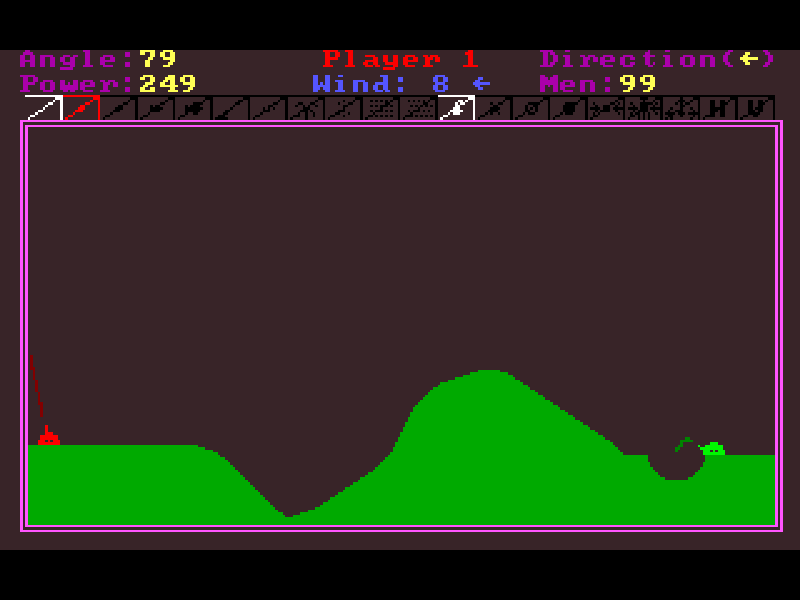
Tank Wars is Kenneth Morse’s artillery game about judging a shot across an uneven landscape. Each tank has an elevation, a firing direction and a power setting. Wind changes the flight of a shell, explosions cut into the ground, and a surviving opponent takes the next turn. Between rounds, earned points can be spent on additional weapons.
This page runs the 3.2 DOS shareware release. The author’s configuration utility has generated its default settings, and the documented /NEW option starts a five-round practice match against the easiest computer opponent. It is a useful introduction before trying the original game’s larger matches, which support up to ten human or computer-controlled tanks.
Use Left and Right to tilt the gun, then Up and Down to adjust power. Space fires. The direction indicator matters as much as the angle: tilting past zero turns the barrel to the other side. The original manual and registration notice are included; this remains a shareware evaluation, not a registered edition.
Start here
Quick tips
Read the wind indicator before shooting. Use the previous shell’s landing point to correct your next attempt.
Hold Alt with an aiming or power key for single-step adjustments. Page Up and Page Down change power by 100.
Tab cycles through weapons you own. Dim weapon icons are unavailable; the red icon is the loaded weapon.
- Left / Right
- Tilt the gun to change its elevation and firing direction.
- Up / Down
- Increase or decrease shot power.
- Space / Enter
- Fire the selected weapon.
- Page Up / Page Down
- Change power by 100.
- Alt
- Hold with an aim or power key for one-unit adjustments.
- I
- Reverse firing direction while retaining the angle.
- Tab
- Select the next owned weapon; Shift+Tab cycles backward.
- Ctrl+P
- Pause and show the round status during play.
- Ctrl+Q
- Abort the current game.
- D
- Leave the weapon-purchase screen and continue.
Keep playing
Similar Games
Ratings & comments
Help improve this entry
Something not working?
Report a gameplay or information problem. Short reports are enough.
Archive notes
Rights and Source Notes
Browser play is available for this entry.
- Distribution
- Shareware
- Browser player
- js-dos · Browser play
- Added to archive
- 2026-11-05
No comments yet. Be the first to share a tip.