Traffic Department 2192
Saves are stored in this browser.
Player notes
About this game
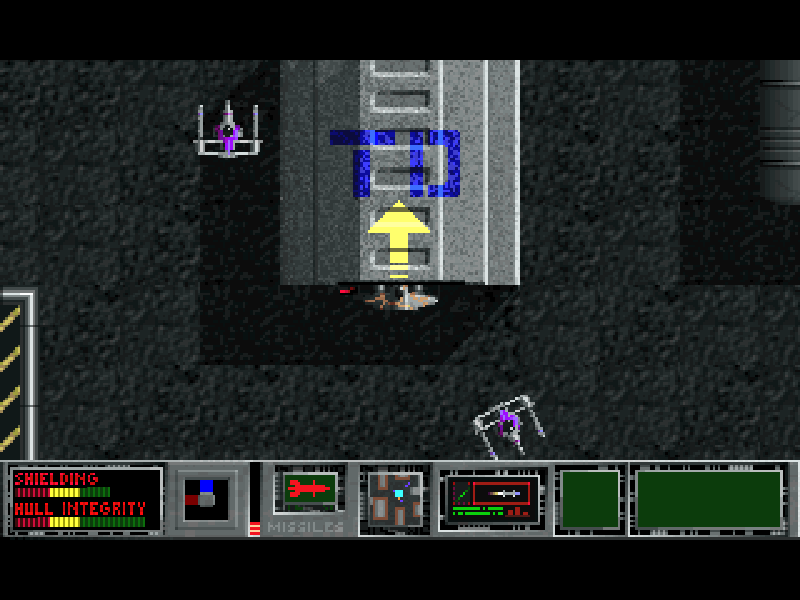
Traffic Department 2192 is a 1994 top-down action game by John Pallett-Plowright of P² Productions, published by Safari Software. Lieutenant Velasquez serves in a traffic department drawn into a war against the Vulture forces. Missions put you behind the controls of a hoverskid, with story scenes and briefings explaining who you are pursuing and why.
Combat is built around steering through city streets, choosing between guns and missiles and watching your shield and hull indicators. The mission map helps you locate other craft, while incoming communications provide context during play. Read the briefing before treating every nearby vehicle as a target.
This is the complete three-episode DOS 1.0 release distributed with a CC BY-ND 3.0 license in 2007. Original game files, dialogue options, credits and the complete original distribution archive are preserved. The web launch menu selects an original episode executable; it does not rewrite the game. Audio uses the original manual's /a option for AdLib music and PC-speaker effects.
Choose episode 1, 2 or 3 at launch. At the dialogue warning, 1 selects the original script and 2 the author's edited alternative. Both remain available; the original script contains coarse language and suggestive dialogue. Select Start New Game, then use Space to advance briefings or Esc when the game offers to go straight to the action. Our gameplay check covers the first episode's opening mission, not completion of all three episodes.
Start here
Quick tips
For a first visit, choose episode 1 and read the opening mission briefing before skipping to the action.
Use Tab to switch between guns and missiles; check the weapon display so you do not waste the wrong ammunition.
F5 opens the mission map. Tab changes the ship being inspected there, and Esc returns to play.
The original script and the author's edited dialogue are separate startup choices. Press 2 at that prompt if you prefer the edited text.
- Arrow keys
- Move the hoverskid
- Space
- Fire the selected weapon; advance dialogue
- Tab
- Switch weapons; change the inspected ship on the map
- Numpad 0
- Use the afterburner
- Numpad +
- Alternative afterburner key
- F5
- Open the mission map
- F6
- Read an incoming communication
- Alt
- Switch to infrared view at night
- 1 / 2 / 3
- Select an episode in the startup launcher; 1 or 2 also selects the dialogue version
- Enter
- Confirm a menu choice
- Esc
- Open the menu, leave the map or skip a briefing when prompted
Keep playing
Similar Games
Ratings & comments
Help improve this entry
Something not working?
Report a gameplay or information problem. Short reports are enough.
Archive notes
Rights and Source Notes
Browser play is available for this entry. Official project references are listed below.
- Distribution
- CC BY-ND 3.0
- Browser player
- js-dos · Browser play
- Added to archive
- 2026-10-31
- Official references
No comments yet. Be the first to share a tip.