Tyrian
Saves are stored in this browser.
Player notes
About this game
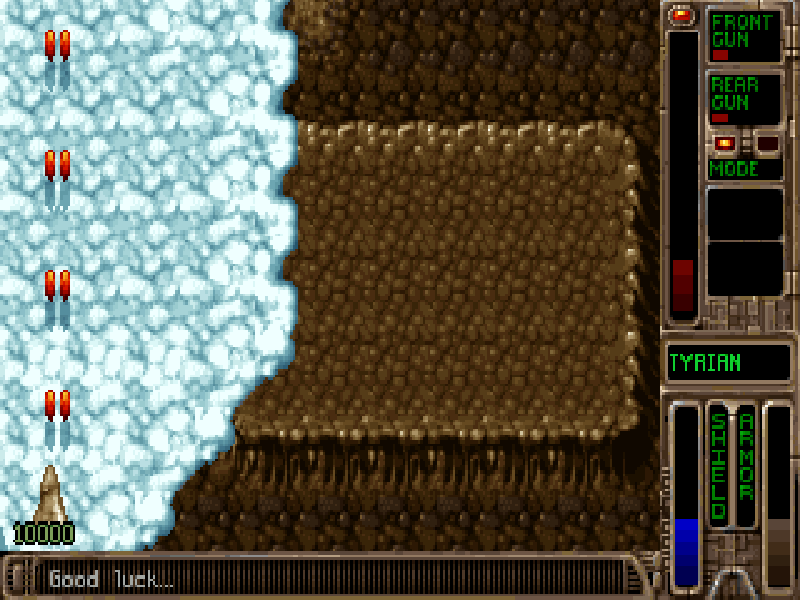
Tyrian is a vertically scrolling space shooter with dense waves of enemies, destructible scenery and a choice of weapon arrangements. Surviving a stage means moving through gaps in the incoming fire while keeping your guns pointed at the next threat.
The single-player Full Game mode adds a shop between stages, where you can inspect the ship and its equipment before choosing the next level. Arcade mode offers a more direct route into shooting. The words Full Game on the mode menu do not unlock the registered episodes in this shareware package.
Choose Start New Game, a single-player mode, Episode 1 and a difficulty. In Full Game mode, select Play Next Level in the shop to launch. The keyboard defaults are the arrow keys to move, Space to fire, Enter to change the firing mode, Ctrl for the left sidekick and Alt for the right sidekick. P pauses the action.
This page runs the original DOS 2.0 shareware release of Tyrian, published by Epic MegaGames, with Episode 1: Escape. It is not Tyrian 2000 or a full registered edition. The original distribution is preserved, with a configuration generated in the included setup program so the browser session can start directly.
Start here
Quick tips
If you reach the equipment shop, choose Play Next Level to enter the first stage.
Start with a single-player mode. The original menu also offers other modes, which are outside this page’s single-player control guide.
Use small movements to avoid shots while holding Space. Large sweeps can carry the ship into another line of fire.
Sidekick keys depend on the equipment currently fitted; they will not produce a useful attack without the corresponding weapon.
- Arrow keys
- Move the ship; navigate menus
- Space
- Fire
- Enter
- Change fire mode; confirm menus
- Ctrl
- Fire the left sidekick when equipped
- Alt
- Fire the right sidekick when equipped
- P
- Pause or resume
- Esc
- Go back or open the quit prompt
Keep playing
Similar Games

Help improve this entry
Something not working?
Report a gameplay or information problem. Short reports are enough.
Archive notes
Rights and Source Notes
Browser play is available for this entry.
- Distribution
- Shareware
- Browser player
- js-dos · Browser play
- Added to archive
- 2026-10-17