Epic Baseball
Saves are stored in this browser.
Player notes
About this game
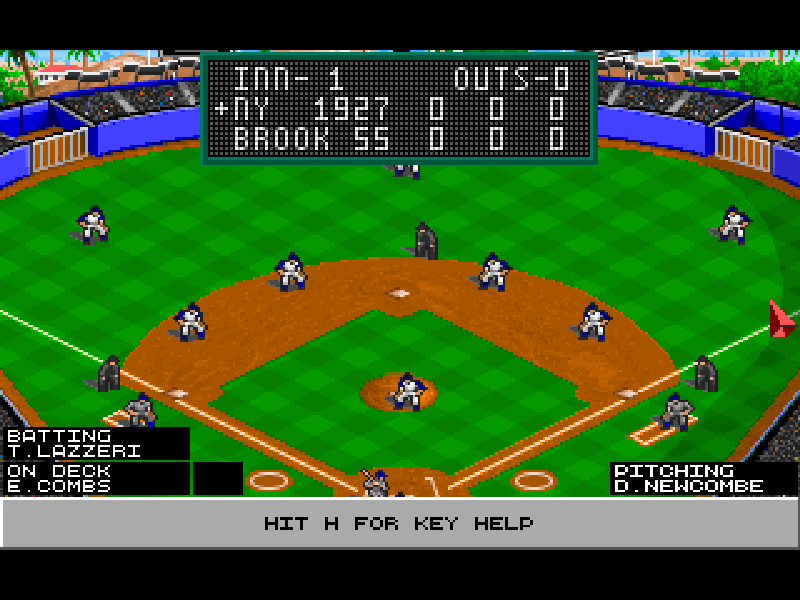
Epic Baseball puts you in the manager’s seat. Choose the teams, starting pitchers and lineups, then make tactical decisions as the simulation resolves the action. This is a baseball management game rather than an arcade game about timing a swing with the arrow keys. Its field animations show the results of those decisions.
The shareware edition provides Exhibition Play. Press A at the main menu to open a game, check the visitor and home-team coach settings, then press 6 to start. Player Coach leaves the decisions to you; Computer Coach delegates them. The original manual explains the lineup screens, pitcher substitutions and statistical reports in detail.
This is the DOS 1.1 shareware distribution published by Epic MegaGames, with its original MicroLeague Interactive Software credits. The bundled setup’s Sound Blaster driver is already selected. During play, H opens keyboard help and B opens the box-score/game menu. That menu includes the original save-and-quit option. League Play and other registered features are outside this edition.
Start here
Quick tips
Start with A for Exhibition Play. The default teams let you try a game without building a league.
Check the coach setting before starting: Player Coach and Computer Coach give you different levels of control.
Press H for context-sensitive keyboard help. Space skips to the next graphics sequence; B opens the game and statistics menu.
- A
- Open Exhibition Play from the main menu.
- 6
- Start the match from the Game Options screen.
- 1 / 2 / 3 / 4 / 5 / 7 / 8 / 9 / 0
- Select numbered tactical options shown by the current play card; meanings depend on batting or fielding.
- Arrow keys
- Move through lists and scroll displayed statistics or keyboard help.
- Enter
- Confirm highlighted choices in selection lists.
- Space
- Skip to the next graphics sequence during a game.
- H
- Show keyboard help during a game; on Game Options, switch the home-team coach.
- B
- Open the box-score/game menu during play; on Game Options, switch the visiting coach.
- F3
- Choose Save Game & Quit from the box-score/game menu, then enter a filename.
- Esc
- Close a subwindow or open the game menu during play.
- Left mouse button
- Select labelled menu items and information panels.
Keep playing
Similar Games
Ratings & comments
Help improve this entry
Something not working?
Report a gameplay or information problem. Short reports are enough.
Archive notes
Rights and Source Notes
Browser play is available for this entry.
- Distribution
- Shareware
- Browser player
- js-dos · Browser play
- Added to archive
- 2026-11-04
No comments yet. Be the first to share a tip.